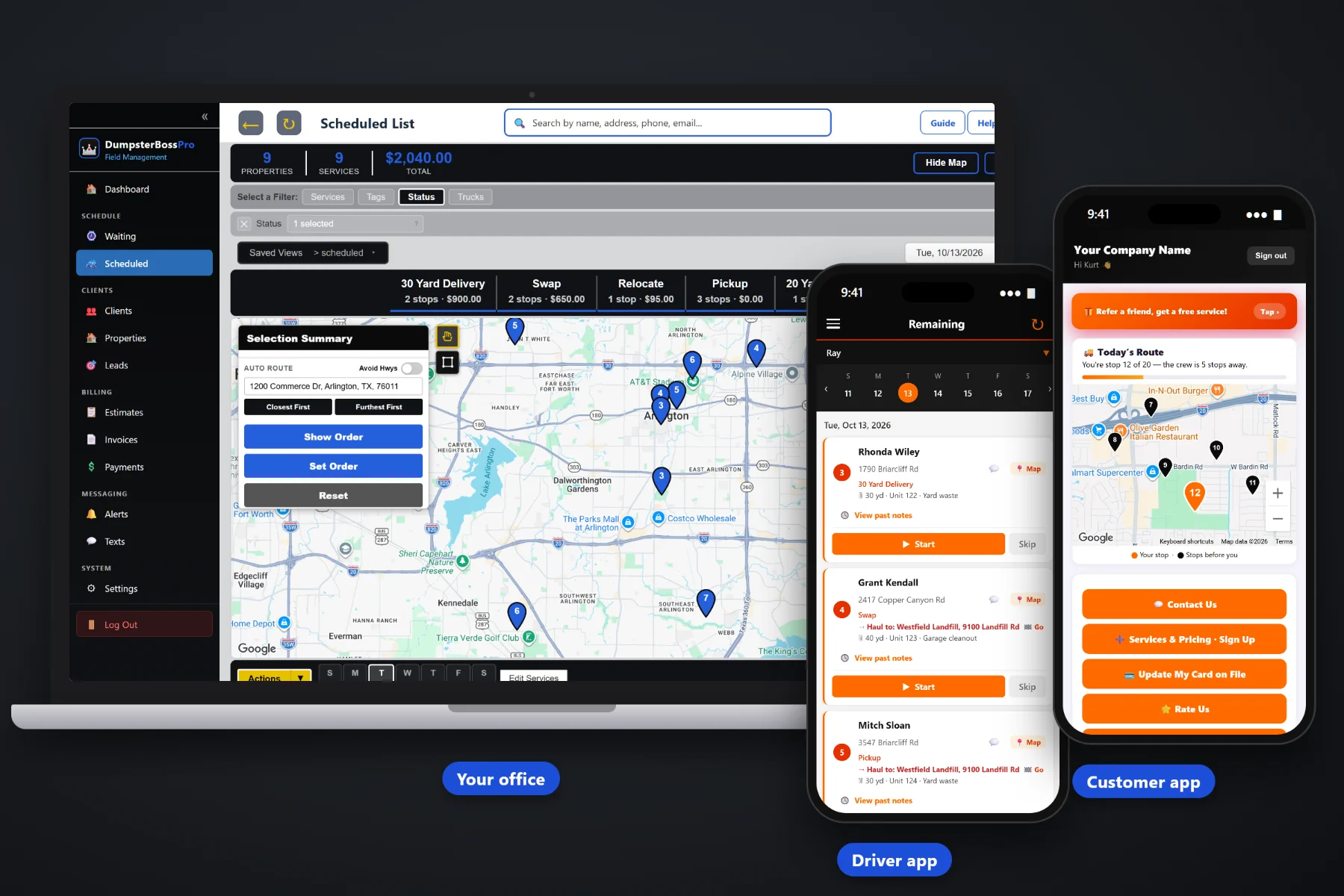
Roll-off work does not fit on a calendar. Every truck carries one can at a time, every pickup ends at a landfill, the 30-yard you need is behind the 20s in the yard and the contractor wants his swap before the crew shows up. DumpsterBossPro is dispatch software built around a Waiting List of delivery, swap and pickup requests on a live map, one-step driver and truck assignment, a dispatch board by truck and automatic texts that answer "when is my dumpster coming?" before the phone rings.
Plans start at $59/month, and what you get is built for the way dumpster rental companies really dispatch — a Waiting List of open requests on a live map, one step to send jobs to a driver and truck, a dispatch board for every truck in route order, and a driver app with the site, the haul-to address and the dumpster details already loaded. Never billed per user.
Every delivery, swap and pickup request lands as a pin at the customer site. See clusters and outliers at a glance, then circle requests on the map or select them from the list.
Assign one job or a whole group to a driver and a roll-off truck at the same time. The jobs move to that truck's board and show up in the driver's app.
Each truck's jobs by day, in route order, with auto-routing. See which trucks are loaded with dump runs and which have room for one more.
The customer site and the landfill or transfer station on every job, both in the driver app with one-tap navigation. Nobody calls the office asking which dump.
One-tap on-the-way and arrival texts from the driver app, a live map of the driver in the customer app and two-way texting for everything else.
Jobs in order, size, unit number and debris type, placement and access notes, start and complete, and photos that attach to the job.
The dispatch board is where the plan meets the real day. Each job carries its type and its size, so a 40-yard pickup of roofing never gets mistaken for a quick 10-yard delivery. When construction season fills the Waiting List, a truck goes down or a contractor needs a same-day swap, the dispatcher has every truck's day in front of them and can move the right job to the right truck.
Dispatch software only works if the office and the drivers actually use it. DumpsterBossPro keeps each screen focused on the job in front of you, so a new dispatcher or a driver who hates phones can be productive on day one.
Import customers by CSV, then add job sites for contractors and property managers with more than one. Add your roll-off trucks and drivers. Records get better every time a job adds a placement note or a photo.
Every delivery, swap and pickup goes in with a site address, a haul-to address, a size, a unit number and a debris type. It lands as a pin on the live map, so you can see all your open requests in one place.
Circle requests on the map or select them from the list and send them to a driver and roll-off truck in one step. They land on that truck's dispatch board in route order and in the driver's app with one-tap navigation.
Turn on on-the-way and arrival texts, let customers watch the driver on a live map, and connect invoicing and card on file. Extra rental days and overweight tons land on the invoice on their own.
A roll-off job is not just an appointment. It is a customer site and a landfill, a can of a specific size, a truck that can carry it, a placement the customer cares about and a rental clock that starts the day the can lands.
A whiteboard does not know that a 30-yard swap at a busy job site needs the truck to show up with an empty 30 already on the back, followed by a run to the transfer station before closing. It does not tell the driver which landfill takes shingles, show you which truck is about to finish a dump near the next pickup, or text the customer when the truck is on the way.
So dispatch ends up living in one person's head, a whiteboard and a string of texts to drivers. That works until construction season doubles the requests, rain pushes two days of work into one, or the one dispatcher who knows every site goes on vacation. DumpsterBossPro puts all of it in one system the whole office and every driver can see.
To see how the pieces fit together — the Waiting List, assignment, the dispatch board, route order, landfill runs and customer texts — start with Roll-Off Dispatch Software: The Complete Guide for Dumpster Rental Companies.
Every tool here is aimed at the way dumpster rental companies take orders, send trucks, haul loads and get paid — from the first call to the payment.
Every unassigned delivery, swap and pickup on a map at the customer site. Circle requests or select them and hand them out together.
Send jobs to a driver and a roll-off truck at the same time, so the board always shows which truck is committed to which can.
Each truck's jobs by day in route order. Reorder when a contractor swap has to jump the line or a truck goes down.
Chain deliveries, swaps and pickups around landfill runs, and let auto-routing take the first pass on planned days.
The customer site and the landfill or transfer station on every job, both in the driver app with one-tap navigation.
Size in yards, unit number and debris type on every job, so the driver loads the right can and the office reads the size mix on each truck.
Delivery, Pickup, Swap, Dump & Return and Relocate, each its own job type on the board and in the driver app.
One-tap on-the-way and arrival texts, a live map of the driver in the customer app, and two-way texting with every reply on the customer record.
Jobs in order, site and haul-to, dumpster details, placement and access notes, start and complete, and photos.
Customers with multiple job sites, and contractor and commercial accounts billed monthly on one invoice.
Delivery date, pickup date, days included and a daily rate after that, with extra days added to the invoice automatically.
Enter the scale-ticket weight in tons on the job. Tons over the included weight are billed per ton on the invoice.
Quotes with online approval, invoices from the completed job, card on file, online payments, sales tax and payment follow-ups.
Review jobs, truck load, open requests and unpaid invoices each week to see where dispatch is getting stuck.
Add drivers, dispatchers and office staff without per-seat charges. Time clock included. The Crew plan includes unlimited users.
Homeowners who took the morning off and foremen waiting on a swap call back because they don't know when the truck is coming. Automatic texts give them that answer first. The driver taps once for an on-the-way text and once for an arrival text, and the customer can watch a live map of the driver on the way. Two-way texting covers the rest: placement photos, gate codes, pickup requests, honest updates when a truck runs behind. For the full picture of how texting fits into dispatch, read Roll-Off Dispatch Software: The Complete Guide for Dumpster Rental Companies.
Assign a job and it lands in the driver's app with everything attached. They see the jobs in order, the customer site and the haul-to address with one-tap navigation, the size, unit number and debris type, plus placement and access notes. They tap on-the-way so the customer knows, set or pull the can, take photos, enter the scale-ticket weight and mark it complete. The office sees the board update without a phone call.
Pick the plan that fits your company today. Every plan starts with a 14-day free trial, no credit card required.
14-day free trial. No credit card required. Never billed per user.
Practical guides on the Waiting List, assignment, the dispatch board, route order, landfill runs, size mix, swaps, construction season and customer texts — written for dumpster rental companies.
Yes. DumpsterBossPro is dispatch software built around roll-off jobs: a Waiting List of delivery, swap and pickup requests on a live map, one-step driver and truck assignment, a dispatch board by truck and day, a customer site and a haul-to address on every job, dumpster size, unit number and debris type, and job types for Delivery, Pickup, Swap, Dump & Return and Relocate.
Circle requests on the Waiting List map or select them from the list, then choose a driver and a roll-off truck. The jobs move to that truck's dispatch board in route order and show up in the driver's app with the site, the haul-to address, the dumpster details and the notes.
Each rental tracks the delivery date, pickup date, days included and a daily rate after that, and extra days are added to the invoice automatically. The driver enters the scale-ticket weight in tons on the job, and tons over the included weight are billed per ton on the invoice.
No. Each job records the dumpster size and unit number, but DumpsterBossPro does not track container locations with GPS or connect to scale or landfill ticket systems. The scale-ticket weight is entered on the job by the driver or the office.
Yes. Add your trucks and employees, assign every job to a driver and truck, and use the time clock for shifts. DumpsterBossPro is never billed per user, and the Crew plan includes unlimited users.
Start is $59/mo, Pro is $89/mo and Crew is $199/mo with unlimited users. Every plan starts with a 14-day free trial, no credit card required.
DumpsterBossPro dispatches, routes, texts and bills your entire roll-off company from one platform — see the full platform overview.
Put your Waiting List, dispatch board, driver app and customer texts in one place. Try DumpsterBossPro free for 14 days.