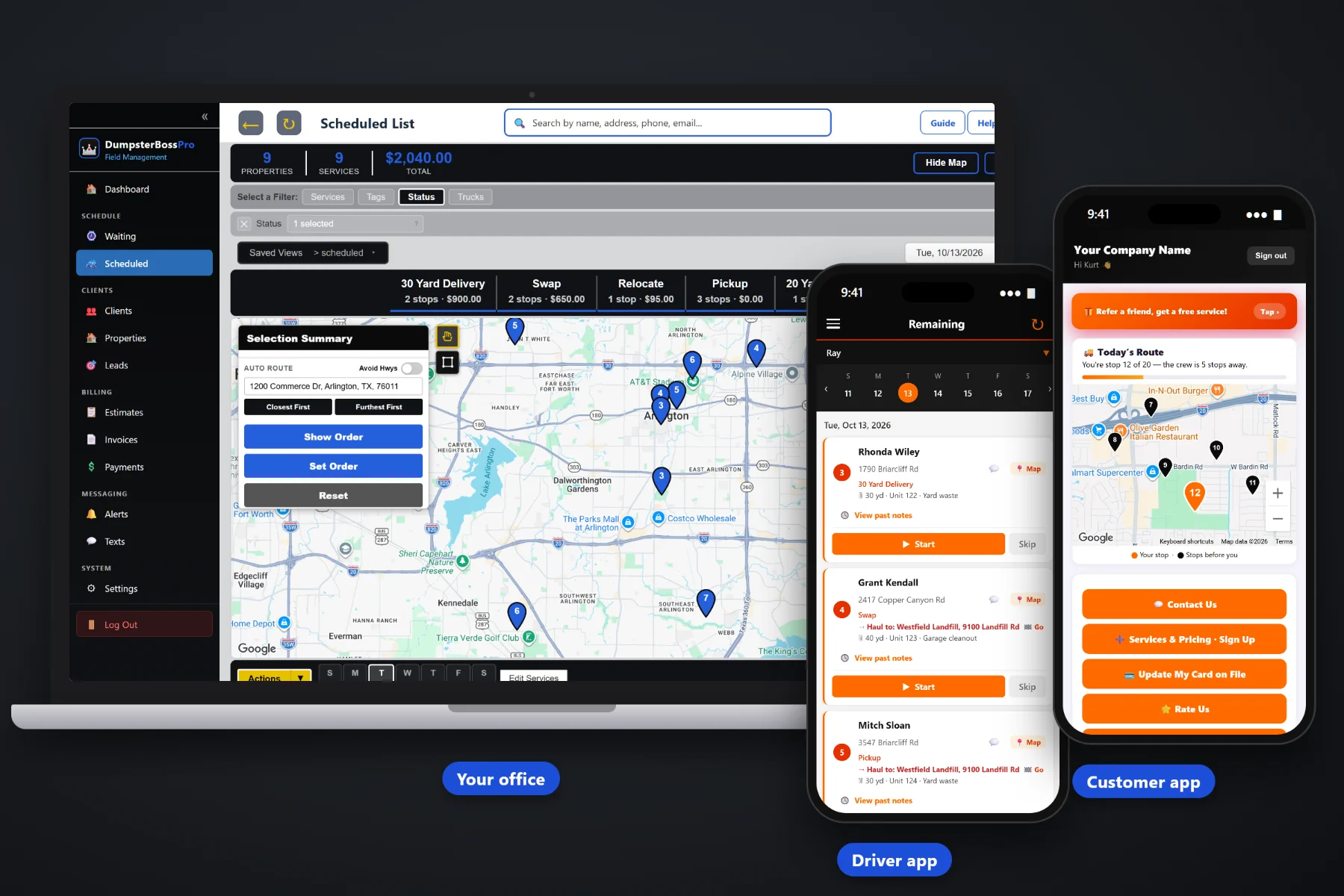
Setting the can is the part your drivers are good at. The order written on a fuel receipt, the swap that never made the whiteboard, the haul-to nobody told the new driver, the four extra rental days nobody counted and the scale ticket that rode around in the door pocket for two weeks are what eat your margin. DumpsterBossPro runs the whole roll-off dumpster rental company in one system — from the request to paid.
Plans start at $59/month, but DumpsterBossPro is not a contact list with a calendar bolted on. It knows every open request, where each load is headed, which driver and truck has it, how many days each rental has run, what the scale ticket said and what every contractor still owes — and you are never billed per user, so adding a driver never adds to the bill.
Delivery, pickup and swap requests land on a live map. Circle requests or select them and assign them to a driver and roll-off truck in one step.
Every truck's jobs by day in route order, with auto-routing to put the drops, swaps and pulls in a sensible sequence.
Every job carries the customer site and the haul-to landfill or transfer station, plus size in yards, unit number and debris type.
Jobs in order, one-tap navigation to the site and the haul-to, placement and access notes, start and complete, photos and one-tap texts.
Delivery date, pickup date, days included and a daily rate after that. Scale-ticket tons over the included weight billed per ton.
Extra days and overages added to the invoice automatically, contractors billed monthly on one invoice, card on file and online payments.
This is the heart of DumpsterBossPro. The request lands on the Waiting List with the site address, the size and the debris type. Dispatch assigns it to a driver and truck, it moves to the dispatch board in route order, the driver works it from the app, and when the can comes back the rental days and the scale-ticket weight turn into an invoice that can be paid online or charged to the card on file. Nothing gets read over the radio, and nothing lives on a whiteboard. For the full walkthrough, read Dumpster Rental Software: The Complete Guide for Roll-Off Dumpster Companies.
Most field service software is built for trades that go to one address and fix something, and roll-off gets squeezed into fields that don't fit. DumpsterBossPro is built around jobs with a site and a haul-to, cans with sizes and unit numbers, rental clocks, scale tickets and contractor accounts. Bring in your customers, add your drivers and trucks, and you can run tomorrow's jobs from it.
Bring your customer list in by CSV, then add your contractor accounts and their job sites, your drivers and your trucks. You can be dispatching real jobs the same day you sign up.
The Waiting List and dispatch board show every open request and every truck. Delivery, Pickup, Swap, Dump & Return and Relocate jobs are easy to tell apart, in 10, 15, 20, 30 and 40 yard sizes.
Drivers see their jobs in order, navigate to the site and the haul-to with one tap, read the placement notes, take photos and tap complete. No printed route sheet and no radio calls for the address.
Extra rental days and tons over the included weight land on the invoice automatically, contractors get one monthly invoice, and payment follow-ups chase the invoices that sit.
Every roll-off rental has a site, a haul-to, a can, a driver, a truck, a rental clock and a scale ticket — and a customer who may be a homeowner paying once or a contractor paying monthly. Every hand-off is a chance for something to fall through.
Most roll-off companies run on an order pad, a whiteboard in the shop and a spreadsheet somebody updates on Fridays. It works until spring cleanup doubles the requests, until a driver sets a 20 where the customer wanted a 30 because the size was never written down, until a can sits out eighteen days on a seven-day rental and comes back without anybody counting, or until a load of shingles crosses the scale heavy and the ticket never makes the invoice. Generic software doesn't help, because it has no place for haul-to addresses, dumpster sizes, rental days or tons over the included weight.
DumpsterBossPro does. Requests wait on a live map, trucks sit on the dispatch board, drivers carry both ends of every haul in the app, and every finished rental turns into an invoice with the extra days and the overage already on it. It's built around the way a roll-off dumpster rental company actually runs.
This page covers the hub — how all the pieces connect. To see each piece in more depth, explore the full DumpsterBossPro platform.
Every tool in DumpsterBossPro was built with roll-off dumpster rental in mind — not adapted from a generic service app and called good enough.
Delivery, pickup and swap requests show as pins on a live map, so the office can see clusters, outliers and what is still waiting at a glance.
Circle requests on the map or select them and assign them to a driver and roll-off truck in one step.
Every truck's jobs by day, in route order, so same-day swaps and scheduled deliveries share one board.
Set the order by hand or let auto-routing put each truck's drops, swaps and pulls in a sensible sequence.
The customer site and the landfill or transfer station on every job, both in the driver app with one-tap navigation.
Size in yards, unit number and debris type on every job, so the right can goes out and the load goes to the right place.
Delivery, Pickup, Swap, Dump & Return and Relocate, in 10, 15, 20, 30 and 40 yard sizes.
Delivery date, pickup date, days included and a daily rate after that. Extra days are added to the invoice automatically.
Enter the scale-ticket weight in tons on the job, and tons over the included weight are billed per ton on the invoice.
Jobs in order, site and haul-to, dumpster details, placement and access notes, start and complete, and photos.
Photos at the drop and the pull stay with the job, ready when a customer asks about the driveway a week later.
On-the-way and arrival texts from the driver app, automated texts and emails, and two-way texting in one thread per customer.
Customers watch a live map of the driver on the way, see invoices, pay online, keep a card on file, request a service and choose their alerts.
Builders, property managers and restoration companies keep every job site under one customer.
Contractor and commercial accounts billed monthly on one invoice, with every rental, swap, extra day and overage on it.
Requests from your website land on the Waiting List, ready for the office to confirm and assign.
Send a quote with the size, days included, daily rate and weight terms, and let the customer approve it online.
Finished rentals become invoices with the size, extra days, overages and sales tax already on them.
Keep a card on file and auto-bill the customers set up for it. Online payments and payment follow-ups handle the rest.
See jobs, revenue, unpaid invoices and account balances so you know how each truck and each month is really doing.
Drivers and trucks are records in the system, and the time clock keeps hours next to the jobs.
Bring your customer list over from a spreadsheet or your old system instead of typing it in one name at a time.
Add drivers, dispatchers and office staff without a per-seat bill. The Crew plan includes unlimited users.
Try it with your own customers, trucks and jobs for 14 days. No credit card required to start.
The margin in roll-off lives in two places — the days a can sits past its rental and the tons a load goes over its included weight — and that is exactly where it leaks. A can that came back on day eleven of a seven-day rental, a shingle load that crossed the scale heavy, a contractor's swap that was done but never billed. DumpsterBossPro tracks the delivery date, pickup date, days included and daily rate on every job and adds the extra days to the invoice automatically, and the scale-ticket tons on the job turn into a per-ton overage. Learn how in Billing Extra Rental Days Automatically Instead of Arguing About Them.
The driver taps on-the-way and the customer gets a text — and can watch the truck coming on a live map in the customer app. He navigates to the site with one tap, reads the placement notes, sets the can, takes a photo and taps complete. When the can is pulled, he navigates to the haul-to, the scale-ticket tons go on the job, and the finished rental becomes an invoice with the extra days, the overage and sales tax already on it. The customer pays online or the card on file is charged.
Pick the plan that fits your operation. Adding a driver, a dispatcher or an office helper never adds a per-seat charge, and every plan starts with a 14-day free trial.
No credit card required. 14-day free trial. Never billed per user.
Every job has the customer site address and a haul-to address for the landfill or transfer station, both in the driver app with one-tap navigation, plus the job type, the dumpster size in yards, the unit number, the debris type, placement and access notes, the assigned driver and truck, photos from the driver app, the rental dates and the scale-ticket weight.
Delivery, pickup and swap requests land on a Waiting List shown on a live map. You can circle requests or select them and assign them to a driver and roll-off truck in one step. Assigned jobs move to the dispatch board, organized by truck and day, with route order and auto-routing.
Each job tracks the delivery date, the pickup date, the days included and a daily rate after that, and extra days are added to the invoice automatically. The scale-ticket weight in tons is entered on the job, and tons over the included weight are billed per ton on the invoice.
Yes. Contractor and commercial accounts can be billed monthly on one invoice, and customers with multiple job sites keep every site under the one customer. DumpsterBossPro does not handle permits; permit and disposal rules vary by city and county, so check what applies where you work.
Yes. Finished rentals become invoices with sales tax applied, customers can pay online through the customer app, you can keep a card on file, auto-bill customers set up for it and send payment follow-ups on unpaid invoices.
Start is $59/month, Pro is $89/month and Crew is $199/month with unlimited users. You are never billed per user. Every plan starts with a 14-day free trial and no credit card is required.
Deliveries, pickups, swaps, dump and returns, relocates, rental days, weight overages and contractor billing all run from the same platform. See the full DumpsterBossPro overview.
Practical guides on running a roll-off dumpster rental company from one system: requests, dispatch, drivers, rental days, weight overages, contractor accounts, customer texts and getting paid. Start with Dumpster Rental Software: The Complete Guide for Roll-Off Dumpster Companies.
DumpsterBossPro keeps every request, driver, truck, rental, scale ticket, contractor account and invoice in one place, so your drivers haul more and your office chases less. Try it free for 14 days.