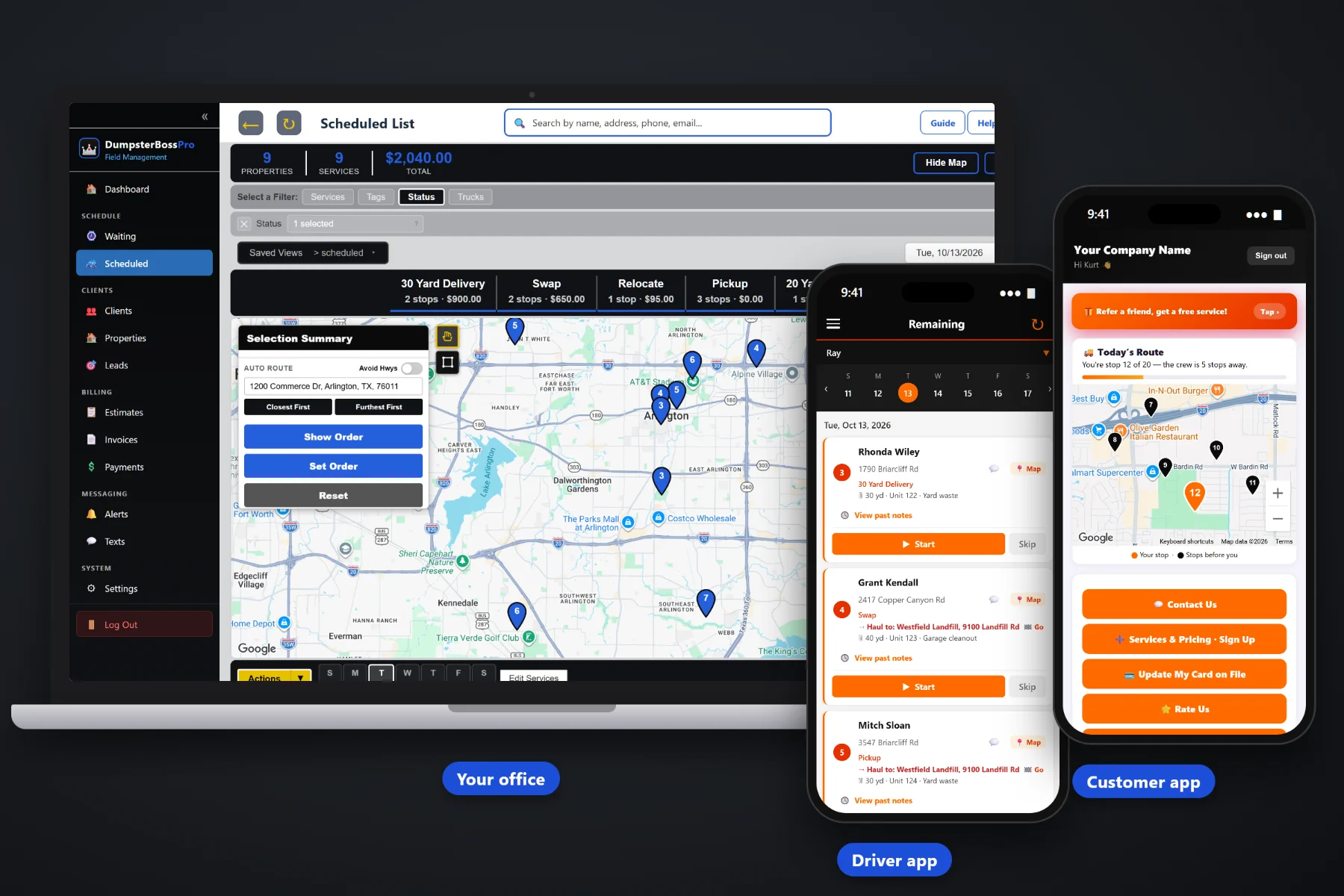
The price you gave on the phone is worth nothing if the caller never hears from you again. DumpsterBossPro turns every call and web request into a lead, every lead into a quote the customer approves online, and every approved quote into an order with the size, delivery date, placement and terms already on it. Quotes that sit get followed up automatically.
Plans start at $59 a month, and you are never billed per user. That price covers what turns calls into booked rentals: web request forms, quotes customers approve online, automatic follow-up on quotes that sit, the size, dates and placement captured on the order, and a customer app for repeat requests. Add everyone who answers your phone without your bill going up.
Put a request form on your own website. Every after-hours request arrives as a lead next to your phone leads, ready to quote in the morning.
Send the quote by text or email. The customer approves it online, and the size, price and terms they accepted are on record.
Quotes that sit unanswered get followed up automatically, so the customer who meant to call back actually books.
Every job carries its dumpster details: size, unit number and debris type, from the quote through dispatch and billing.
Placement notes and photos travel to the driver app, so the driver knows where the can goes before backing in.
Repeat customers request service, see invoices, pay online and keep a card on file in the customer app.
The quote that wins is usually the one that shows up in writing first. DumpsterBossPro logs the caller as a lead while you talk, lets you build a quote with the size, included rental days, included weight and price, and sends it for online approval before you hang up. If it sits, automatic follow-up keeps you in front of the customer. When they approve, it becomes the order, with nothing retyped. DumpsterBossPro does not offer a live online booking calendar or instant online pricing; your office answers every request and confirms every order.
Booking details only get captured when capturing them is faster than skipping them. The software has to keep up with a call in progress and a customer who wants an answer now.
A phone call, a web request form on your site or a repeat customer in the customer app. Each one becomes a lead or a request in the same place.
Pick the size from the project and debris, add the included days and weight terms, and send the quote by text or email for online approval.
Confirm the delivery date and placement notes. The order lands on the Waiting List on the live map, and the customer gets a confirmation.
Dispatch puts it on a truck and day, the driver sees the notes and photos, and the invoice bills what was approved plus any extra days or overage.
In most roll-off offices, bookings live in a notepad by the phone, an email inbox and the owner's text messages. Prices get quoted out loud, terms never get written down, and nobody knows which callers were ever followed up with.
When booking runs on paper, the failures are predictable: a caller gets a price and is never heard from again, a 30 yard goes out for a concrete job, and a can lands on the wrong side of the driveway because nobody asked. Then the customer disputes the extra days and the overweight because they never saw the terms in writing.
DumpsterBossPro keeps every request, quote and approval on one record, with the size, debris type, delivery date, placement and terms carried all the way to the invoice. New to booking in software? Start with Dumpster Rental Booking Software: The Complete Guide for Roll-Off Companies.
It is the same platform roll-off companies use for dispatch, the driver app, rental tracking, contractor accounts and invoicing, so your bookings live in the same account as the rest of the business.
Everything a roll-off company needs to answer requests fast, get quotes approved, capture the details that prevent bad deliveries and keep repeat customers ordering.
A request form on your own website sends every submission in as a lead, day or night.
Log the caller while you talk, so no price goes out without a name and number behind it.
Quotes and estimates go out by text or email, and customers approve them online.
Quotes that sit unanswered are followed up automatically, without anyone keeping a list.
Size, unit number and debris type on every job, across 10, 15, 20, 30 and 40 yard containers.
Rental days included with a daily rate after, and extra days invoiced automatically.
The scale-ticket weight is entered on the job and overage is billed per ton at your rate.
Placement notes and photos captured at booking show up in the driver app.
Booked requests wait on a live map, then move to the dispatch board by truck and day.
Booking confirmations and on-the-way messages go out automatically, and customers can text back.
Repeat customers request service, see invoices, pay online, keep a card on file, watch the driver on a live map and choose their alerts.
Customers with multiple job sites, and contractor accounts billed monthly.
Take a prepayment or a card on file at booking, with auto-billing and online payments.
The approved quote becomes the invoice, with sales tax, extra days and overage on it.
Reports on what is billed and collected, and a CSV import for the customer list you already have.
Add everyone who answers the phone, dispatches or drives without your software bill going up.
Most bad deliveries and billing disputes start at the booking desk. The wrong size because nobody asked about the debris. A can on the wrong side of the driveway because nobody asked where. An overweight charge the customer never heard about. DumpsterBossPro keeps those answers on the order, where dispatch, the driver and the invoice all read from the same record. If the can has to sit at the curb, placement and permit rules vary by city, so tell the customer to check local requirements. Want the walkthrough? Read Helping Customers Pick the Right Dumpster Size Before You Quote.
The first rental takes questions, a quote and some follow-up. The fifth should not. In the DumpsterBossPro customer app, repeat customers request a delivery, swap or pickup without calling, see their invoices, pay online, keep a card on file, watch the driver on a live map and pick the alerts they want. Requests land on the Waiting List, and your office still confirms and schedules every one. Contractors with several jobs running keep each job site on one account, billed monthly. Read Letting Repeat Customers Request a Dumpster From the Customer App.
Add everyone who answers the phone, every dispatcher and every driver without your software bill growing with your headcount.
No credit card required to start. Never billed per user.
They can send a request through a web request form on your website, and it arrives as a lead. You reply with a quote they approve online. DumpsterBossPro does not offer a live availability calendar or instant online pricing; your office confirms every order, which lets you check the size, date and placement before committing a truck.
You send the quote or estimate by text or email. The customer opens it on their phone and approves it online. The approved quote becomes the order, so the size, price and terms carry through to dispatch and the invoice without retyping.
DumpsterBossPro follows up automatically on quotes that sit unanswered. Customers can also reply by text with questions, and two-way texting keeps that conversation with the customer record.
Each rental tracks the days included and a daily rate after, and extra days are invoiced automatically. The scale-ticket weight is entered on the job and overage is billed per ton at your rate. Put those terms on the quote so customers approve them up front.
No. Permit and placement rules for cans at the curb or in the public right-of-way vary by city. Ask about placement at booking, note it on the order and tell the customer to check their local requirements before delivery day.
Start is $59/month, Pro is $89/month and Crew is $199/month. You are never billed per user, and every plan starts with a 14-day free trial with no credit card required.
Quotes and booking are one part of what the platform does for roll-off companies, alongside dispatch, the driver app, rental tracking, contractor accounts and invoicing. See the full DumpsterBossPro platform overview.
Practical articles on turning calls and web requests into booked rentals: request forms, choosing the right size, what's included, quotes approved online, follow-up, delivery dates and placement, and repeat orders from the customer app.
Web requests, quotes approved online, automatic follow-up, and the size, date, placement and terms on every order. Try DumpsterBossPro free for 14 days.